
Courses
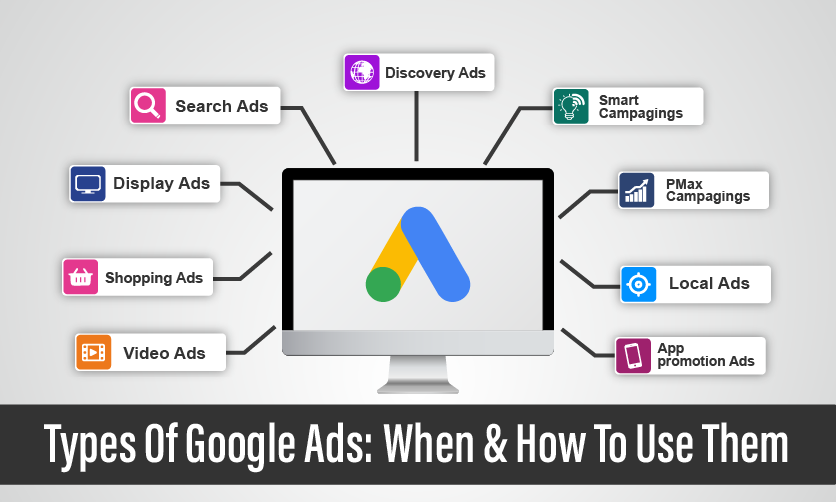
Do you want to know about the types of Google ads that can bother you in the long run? If yes, then this article can prove to be a game changer for you. Brands not only need Ads for brand promotion but they require the right platform to boost their brand image.
Google Ads offers diverse advertising options to reach target audiences effectively. Search Ads appear on Google’s search results, targeting users actively searching for specific keywords, ideal for driving conversions.
Display Ads use visuals on websites within Google’s Display Network, boosting brand awareness. Video Ads run on YouTube and other platforms, engaging users through skippable or non-skippable formats.
Google Ads is an online advertising platform developed by Google, allowing businesses to create and display ads across Google’s search engine, YouTube, and partner websites. Advertisers bid on keywords or placements to reach targeted audiences, paying per click (PPC), impression, or conversion.
It offers various ad formats, including Search Ads (text-based on search results), Display Ads (visuals on websites), Video Ads (on YouTube), Shopping Ads (product listings), App Ads (promoting mobile apps), and Local Ads (driving store visits).
With robust targeting options like demographics, interests, and locations, Google Ads helps businesses boost brand visibility, drive traffic, and increase sales, making it a versatile tool for digital marketing.
Your journey into digital marketing starts hereGet Trained by Google Ads Specialists |
|
| Google Ads Certification Training | |
| More Learning Options for you: Diploma in Digital Marketing | Facebook Ads Certification | Certification Course |
There are several types of Google ads. You just need to select the right ad forms that suit your brand the best as per your needs. So, let’s explore the ad types that can easily meet your requirements with complete ease.
Search Ads are text-based advertisements that appear at the top or bottom of Google search results when users query relevant keywords. They include a headline, description, URL, and extensions like site links or call buttons. Advertisers bid on keywords (e.g., “best running shoes”) using models like cost-per-click (CPC). These ads are intent-driven, targeting users actively seeking products or services.
Key Features: High relevance through keyword matching; ad rank based on bid, quality score, and relevance; responsive search ads that auto-optimize combinations.
Suitable Industries: E-commerce (for product searches like apparel or electronics), professional services (law firms, accountants for queries like “tax advisor near me”), and healthcare (clinics targeting “dentist appointment”). They excel in industries with high search volume and transactional intent, such as legal services or home repair, where users are ready to convert. Avoid brand awareness in low-search niches like niche B2B tech.
Display Ads are visual banners, images, or interactive ads shown on over two million websites and apps in the Google Display Network (GDN). They use targeting like demographics, interests, topics, or remarketing to reach users browsing content. Select the right types of Google ads that suit your needs.
Key Features: Formats include static images, responsive ads that adapt to space, and rich media; impression-based pricing (CPM) or CPC; audience targeting with affinity or in-market segments.
Suitable Industries: Consumer goods (fashion brands building awareness via lifestyle sites), education (universities targeting students on study-related pages), and B2B (software companies remarketing to site visitors). Ideal for industries needing broad reach, like travel (hotels displaying scenic ads) or automotive (car dealers showcasing models). Not best for urgent services where search intent is key.
Shopping Ads display product images, prices, ratings, and store info directly in Google search results or on the Shopping tab. They pull data from Google Merchant Center feeds, using product attributes for matching. Select the right types of Google ads that meet your requirements.
Key Features: Free organic listings possible; paid ads via CPC; smart shopping campaigns optimize bids automatically; focus on visual appeal and comparison shopping.
Suitable Industries: Retail and e-commerce (clothing, electronics, or home goods stores like Amazon competitors), where visual product comparison drives purchases. Perfect for high-volume sellers in consumer electronics or fashion; less effective for service-based industries like consulting, as they require tangible products.
Video Ads run on YouTube and GDN video partners, in formats like skippable in-stream (TrueView), non-skippable, bumper (short unskippable), or outstream (mobile-only).
Key Features: Targeting by topics, keywords, or audiences; CPV (cost-per-view) or CPM pricing; analytics for engagement like watch time.
Suitable Industries: Entertainment (movie trailers or music labels), education (online courses with demo videos), and consumer brands (food/beverage companies like Coca-Cola for storytelling). Suits creative industries like gaming or fitness (tutorials driving app downloads); not ideal for B2B where text-based info suffices.
App Ads promote mobile apps across Google Search, Play Store, YouTube, and GDN, automatically optimizing for installs or actions like in-app purchases.
Key Features: Universal App Campaigns (UAC) use machine learning; provide ad assets, and Google generates formats; CPI (cost-per-install) or CPA pricing.
Suitable Industries: Mobile gaming (developers like Supercell), fintech (banking apps), and e-commerce (shopping apps like Shopify integrations). Best for app-centric businesses in health/fitness (tracking apps) or travel (booking apps); irrelevant for non-app industries like manufacturing.
Discovery Ads (rebranded as Demand Gen) appear in personalized feeds on YouTube home, Gmail, and Discover app, using visuals and carousels to engage users exploring content.
Key Features: Audience-based targeting with lookalike segments; CPC or CPV; focuses on upper-funnel awareness.
Suitable Industries: Media and publishing (news sites or blogs), lifestyle brands (beauty products), and e-commerce (new product launches). Great for consumer services like subscription boxes or travel agencies inspiring trips; less for local services needing direct action.
Local Services Ads appear at the top of search results for service queries, showing business info, reviews, and a Google Guarantee badge. They’re lead-based, not click-based.
Key Features: Pay-per-lead (PPL); verification required; targets local searches like “plumber near me.”
Suitable Industries: Home services (plumbing, HVAC, cleaning), professional trades (electricians, locksmiths), and healthcare (local clinics). Ideal for small businesses in real estate or automotive repair; not for national e-commerce without physical presence.
Performance Max is an AI-driven campaign type that automatically places ads across all Google channels (Search, Display, YouTube, etc.) based on goals like conversions.
Key Features: Asset groups for headlines, images, videos; smart bidding; optimizes for maximum performance.
Suitable Industries: E-commerce (multi-channel product promotion), SaaS (lead gen across platforms), and retail (seasonal campaigns). Versatile for B2B or consumer services with complex funnels; beginners in any industry can use it for hands-off management.
Smart Campaigns are simplified, automated setups for small businesses, using AI to create and optimize ads primarily on Search and Maps.Types of Google Ads fall in this category as well.
Key Features: Easy setup with minimal input; automatic targeting; budget-based pricing.
Suitable Industries: Small local businesses (cafes, boutiques), startups (quick lead gen), and non-profits (event promotion). Best for industries with limited marketing expertise, like hospitality or personal services; avoid large-scale, data-heavy campaigns.
Bidding strategies in Google Ads determine how you pay for ad interactions (clicks, impressions, conversions) and how Google optimizes ad placement. They fall into two categories: manual (you control bids) and automated (Google’s AI adjusts bids). The choice depends on campaign goals, budget, and industry needs. Recent sources list up to nine key strategies, each tailored to specific objectives like maximizing clicks, conversions, or return on ad spend (ROAS).
How It Works: You set the maximum amount you’re willing to pay per click for each keyword or ad group. You control bids, adjusting based on performance data like click-through rates (CTR) or conversion rates.
Key Features: Full control over bids; ideal for campaigns needing precise budget management; supports enhanced CPC (eCPC), where Google adjusts bids slightly for better conversion likelihood.
Suitable Industries:
Best For: Advertisers with experience optimizing campaigns or those in niche industries with high-cost keywords (e.g., legal services, where CPCs can exceed $50). Not ideal for hands-off management or broad awareness goals.
How It Works: An automated strategy where Google sets bids to drive the most clicks within your budget. You can set a maximum CPC limit to cap costs. Types of Google Ads matters a lot when you want to maximize the leads.
Key Features: Simplifies bidding; focuses on traffic volume; works across Search, Display, and Shopping campaigns.
Suitable Industries:
Best For: Campaigns prioritizing website traffic over conversions, like early-stage startups or media companies. Avoid if conversions or specific ROAS are critical.
How It Works: Google automatically adjusts bids to get the most conversions (e.g., purchases, sign-ups) within your budget. Requires conversion tracking setup.
Key Features: AI-driven; optimizes for actions like form submissions or sales; no need to set individual keyword bids.
Suitable Industries:
Best For: Businesses with clear conversion goals and sufficient historical data (15+ conversions/month recommended). Not suitable for awareness-focused campaigns or low-data scenarios.
How It Works: An automated strategy targeting the highest total conversion value (e.g., revenue from sales) within your budget, rather than just conversion volume.
Key Features: Prioritizes high-value actions; ideal for e-commerce with varied product margins; requires value-based conversion tracking.
Suitable Industries:
Best For: Businesses tracking revenue or profit, aiming to maximize ROAS. Less effective for lead generation without assigned monetary values.
How It Works: You set a target cost per conversion, and Google’s AI adjusts bids to achieve conversions at or below that CPA. Requires conversion tracking and historical data.
Key Features: Balances cost and conversion volume; works for Search, Display, and Video campaigns; ideal for predictable budgets.
Suitable Industries:
Best For: Industries with defined lead values and stable conversion funnels. Not ideal for new campaigns without 30+ conversions in the past month.
How It Works: You set a target return (e.g., $5 revenue per $1 spent), and Google optimizes bids to maximize conversion value while meeting that ROAS. Requires value-based tracking.
Key Features: Focuses on profitability; ideal for revenue-driven campaigns; works across Search, Shopping, and Performance Max.
Suitable Industries:
Best For: Businesses with robust revenue tracking and high-margin products. Avoid if conversion values aren’t consistently tracked.
How It Works: Google adjusts bids to show your ads at a desired percentage of impressions (e.g., 65% of searches) at specific placements (top or absolute top of page).
Key Features: CPM-based; ideal for brand visibility; works for Search and Display campaigns.
Suitable Industries:
Best For: Brand-focused campaigns in competitive markets. Not suitable for direct response or low-budget campaigns due to high costs.
Google Ads provides a variety of audience targeting options to help advertisers reach specific user groups based on their interests, behaviors, demographics, and interactions with a business. These audience types enable precise ad delivery across Search, Display, Video, Shopping, and other campaign formats.
How It Works: Affinity audiences target users based on their long-term interests and passions, derived from their browsing habits, search history, and content engagement. Examples include “Fitness Enthusiasts,” “Foodies,” or “Tech Savants.”
Key Features: Ideal for brand awareness; available on Display, Video, and Demand Gen campaigns; broad reach across Google’s Display Network and YouTube.
Suitable Industries:
Best For: Upper-funnel campaigns in industries like fashion, travel, or entertainment aiming to build brand recognition. Less effective for immediate conversions due to broad targeting.
How It Works: In-Market audiences target users actively researching or intending to purchase specific products or services, based on recent searches, clicks, or site visits. Examples include “Home Furniture,” “Car Buyers,” or “Wedding Planning.”
Key Features: High purchase intent; available for Search, Display, Video, and Shopping campaigns; dynamic updates based on user behavior.
Suitable Industries:
Best For: Conversion-driven campaigns in retail, automotive, or travel, where users are close to purchasing. Not ideal for early-stage awareness.
How It Works: Custom audiences allow advertisers to create tailored segments by combining keywords, URLs, and apps related to user interests or behaviors. For example, inputting “yoga classes” and competitor URLs creates a yoga-focused audience.
Key Features: Highly customizable; supports Search, Display, and Video campaigns; combines affinity and in-market traits for precision.
Suitable Industries:
Best For: Niche industries or B2B services needing specific targeting, like tech or specialty retail. Less effective without clear keyword or competitor data.
How It Works: Remarketing targets users who previously interacted with your website, app, or ads (e.g., visited a product page, abandoned a cart). You create audience lists via Google Analytics or ad tags.
Key Features: High conversion potential; works across Search, Display, Video, and Shopping; supports dynamic remarketing (showing specific products viewed).
Suitable Industries:
Best For: Industries with longer sales cycles or high cart abandonment, like retail or SaaS. Requires sufficient website traffic (100+ visitors recommended).
How It Works: Customer Match uses your first-party data (e.g., email lists, phone numbers) to target existing customers or similar users across Google’s platforms. Lookalike audiences (Similar Audiences) expand reach to users with comparable traits.
Key Features: Precise targeting; supports Search, Display, Video, and Shopping; ideal for loyalty campaigns or upselling.
Suitable Industries:
Best For: Businesses with robust CRM data in retail, finance, or travel. Not suitable for new businesses without customer lists.
How It Works: Detailed Demographics target users based on attributes like age, gender, parental status, household income, or education level, derived from Google account data and browsing behavior.
Key Features: Available for Search, Display, and Video; allows narrow targeting (e.g., “Parents with young children”); combinable with other audiences.
Suitable Industries:
Best For: Industries with demographic-specific products, like baby products or luxury retail. Less effective for broad or B2B audiences.
How It Works: Life Events target users during major milestones like getting married, moving, or graduating, based on their search and content engagement patterns. Types of Google ads determines the future of your business to a greater extent.
Key Features: High-intent targeting; works for Display, Video, and Demand Gen; focuses on transitional moments.
Suitable Industries:
Best For: Industries tied to life changes, like real estate or event planning. Not ideal for evergreen products without milestone relevance.
Few Google Ads related topics for your knowledge
Conversions in Google Ads are specific actions users take after interacting with your ads, tracked via Google Ads conversion tracking, Google Analytics, or imported data. These actions vary by campaign type (Search, Display, Video, Shopping, etc.) and business objectives (sales, leads, engagement). Google Ads supports multiple conversion types to capture diverse user behaviors, from online purchases to offline store visits.
How It Works: Website Actions track user activities on your website, such as purchases, form submissions, or page views, after clicking an ad. You set up a conversion tracking tag (a snippet of code) via Google Ads or Google Analytics to monitor specific events like “Add to Cart” or “Contact Form Submitted.”
Key Features:
Suitable Industries:
Best For: Businesses with transactional websites aiming for sales or lead generation. Requires a website with trackable actions and sufficient traffic (15-30 conversions/month recommended for optimization). Less effective for awareness campaigns without clear website goals.
How It Works: App Actions track in-app activities like installations, purchases, or specific events (e.g., level completion in a game) after users engage with App campaigns. Tracking is implemented via Firebase, Google Play, or third-party analytics.
Key Features:
Suitable Industries:
Best For: App-centric businesses aiming to drive downloads or in-app engagement. Not suitable for industries without mobile apps.
How It Works: Phone Call conversions track calls made from ads (e.g., clicking a call extension) or website interactions (e.g., clicking a “Call Now” button). You can set minimum call durations (e.g., 60 seconds) to qualify as a conversion.
Key Features:
Suitable Industries:
Best For: Service-based industries where phone calls drive leads. Less relevant for e-commerce or app-focused businesses.
How It Works: Offline Conversions track actions that occur outside the digital space, such as in-store purchases or signed contracts, after an ad interaction. Advertisers import data from CRM systems or use Google’s Offline Conversion Tracking (OCT) to match conversions to ad clicks via GCLID (Google Click Identifier).
Key Features:
Suitable Industries:
Best For: Industries with offline sales processes or high-value transactions. Requires robust CRM systems and data-matching capabilities.
How It Works: Store Visits track physical store visits attributed to ad interactions, using location data from users’ devices (with consent). Available for businesses with verified Google Business Profile locations.
Key Features:
Suitable Industries:
Best For: Brick-and-mortar businesses with multiple locations. Not suitable for online-only businesses or single-location stores with low traffic.
How It Works: Local Actions track specific interactions with local business assets, such as clicking “Get Directions,” “View Menu,” or “Order Online” on Google Maps, Search, or Local Services Ads.
Key Features:
Suitable Industries:
Best For: Small, local businesses aiming to drive in-store or service engagement. Less relevant for national or e-commerce brands.
How It Works: Google Ads distinguishes between Primary and Secondary conversions. Primary conversions (e.g., purchases, sign-ups) are used for bidding optimization in automated strategies like Target CPA or ROAS. Secondary conversions (e.g., page views, add-to-cart) are tracked for insights but don’t influence bidding.
Key Features:
Suitable Industries:
Best For: Any industry with multiple funnel stages, allowing tracking of both high-value and supporting actions. Requires clear goal prioritization.
Extensions are optional add-ons that expand the content of Google Ads, primarily for Search, Performance Max, and some Display campaigns. They display additional details like phone numbers, locations, or links to specific pages, improving ad relevance and user experience. Extensions can be manual (set by advertisers) or automated (Google applies them dynamically).
How It Works: Sitelink Extensions add clickable links to specific pages on your website (e.g., “Shop Men’s Shoes” or “Contact Us”) below the main ad. They direct users to relevant sections, improving navigation.
Key Features:
Suitable Industries:
Best For: Businesses with diverse website offerings needing to highlight specific pages. Boosts CTR by 10-20% in retail campaigns. Less effective for single-page sites.
How It Works: Callout Extensions display short, non-clickable text snippets (e.g., “Free Shipping” or “24/7 Support”) to highlight unique selling points or offers.
Key Features:
Suitable Industries:
Best For: Industries emphasizing benefits or promotions, like retail or hospitality. Ideal for boosting ad relevance in competitive markets.
How It Works: Structured Snippets showcase specific aspects of products or services (e.g., “Types: Laptops, Desktops” or “Services: Plumbing, Electrical”) in a predefined format with headers like “Brands” or “Destinations.”
Key Features:
Suitable Industries:
Best For: Businesses with categorized offerings, like retail or education, to clarify product/service scope. Not ideal for single-product businesses.
How It Works: Call Extensions display a phone number or clickable “Call” button, allowing users to call directly from the ad. You can set call hours and track call conversions.
Key Features:
Suitable Industries:
Best For: Service-based industries relying on phone leads, with call conversions costing $20-$50 on average. Less relevant for online-only businesses.
How It Works: Location Extensions show your business address, map pin, or distance to the user, linking to Google Business Profile. They encourage store visits or local engagement. Select the best types of Google ads that can make the process for location extensions.
Key Features:
Suitable Industries:
Best For: Brick-and-mortar businesses with physical locations. Not suitable for online-only models.
Hence, these are some of the crucial facts about types of Google Ads that you must be well aware of. You can share your views on this fact as well. Selection of the types of Google Ads can make your journey for the search for quality leads matters a lot.
You can share your comments and views in our comment box. This will help us to know your take on this matter. Feel free to share your views on it.

 }})